


Download 7-Zip Portable – Free, Secure, Portable File Compression & Extraction Tool for Windows, Mac, Android, iOS
Looking for a reliable, lightweight, and secure way to compress and extract files on the go? 7-Zip Portable is the ideal solution for anyone who needs fast, efficient, and free file management across multiple devices. This portable version of the popular 7-Zip software allows you to carry your compression and extraction tools in your pocket—literally—on a USB drive, SD card, or even a cloud-stored folder.
Whether you're a student managing project files, a professional sharing large documents, or a tech enthusiast handling archives, 7-Zip Portable delivers top-tier performance without requiring installation. With support for 7z, ZIP, RAR, GZIP, BZIP2, TAR, ISO, and many more formats, it’s one of the most versatile compression tools available. The app is open-source, regularly updated, and completely free to download and use.
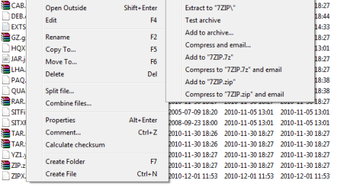
Its intuitive interface and context menu integration make it easy to use, even for beginners. Right-click any file to compress or extract instantly—no setup, no hassle. With advanced features like self-extracting archives, data integrity testing, and benchmarking tools, 7-Zip Portable is more than just a file manager—it’s a must-have digital utility for modern workflows.
Key Features of 7-Zip Portable
7-Zip Portable stands out in the crowded field of file compression tools thanks to its rich feature set, all packed into a lightweight, portable package. One of its most powerful capabilities is its high compression ratio, especially when using the 7z format, which often reduces file sizes by up to 30% more than standard ZIP files. This makes it perfect for storing large media libraries, software backups, or project folders on limited storage devices.
The software supports over 20 archive formats, including native support for 7z, ZIP, GZIP, BZIP2, TAR, and more. It also offers full unpacking support for RAR, CAB, ISO, ARJ, LZH, CHM, Z, CPIO, RPM, DEB, and NSIS, eliminating the need for multiple tools. Another standout feature is self-extracting archives—you can create a single executable file that automatically extracts its contents without requiring 7-Zip to be installed on the target system.
This is ideal for sharing files with users who don’t have compression software. For data integrity, the tool includes a built-in test feature that checks for corruption before extraction. Advanced users will appreciate the benchmarking tool, which measures compression and decompression speed for performance tuning.
You can also set custom hotkey combinations to launch the app or perform common tasks instantly. With context menu integration, you can right-click any file and compress or extract it in seconds. All these features are available in a single, portable executable—no installation required.
How to Install and Use 7-Zip Portable
One of the biggest advantages of 7-Zip Portable is its zero-installation setup. To get started, simply download the latest portable version from a trusted source. The file is typically a single .zip archive containing the executable and necessary components.
Extract this archive to your preferred portable storage device—such as a USB flash drive, external hard drive, or even a cloud folder synced across devices. Once extracted, you’ll find a folder named 7-Zip Portable with a file named 7z.exe. Double-click this file to launch the application.
No admin rights are required, and the software runs directly from the drive. The interface is clean and minimal, with a top toolbar for common actions like creating a new archive, opening an existing one, or extracting files. To compress a file, select it, click “Add,” choose your format (7z, ZIP, etc.), and set your preferences.
For extraction, simply double-click any archive file, or right-click and select “Extract Here” or “Extract to…” from the context menu. The app automatically detects the archive type and handles it accordingly. You can also drag and drop files directly into the window for quick processing.
For advanced users, access the Settings menu to adjust compression levels, encryption options, and hotkeys. Since it’s portable, you can use it on any Windows PC, Mac (via compatibility layers), or even on Linux with WINE—making it truly cross-platform. Updates are straightforward: just download the latest version and replace the old files on your drive.
Compatibility & System Requirements
7-Zip Portable is designed to be highly compatible and runs seamlessly on a wide range of systems. It is primarily optimized for Windows operating systems, including Windows 7, 8, 10, and 11, both 32-bit and 64-bit versions. While it’s a Windows-native application, it can also be used on Mac systems through compatibility tools like WINE or virtual machines, making it accessible to macOS users.
For mobile users, there are Android and iOS versions of 7-Zip available in the Google Play Store and Apple App Store, though these are not the same as the portable desktop version. The portable version is ideal for use on public computers, shared workstations, or school labs where installation is restricted. It doesn’t write to the registry or leave behind temporary files, ensuring complete privacy and no trace of usage.
The system requirements are minimal—just a modern processor, at least 100 MB of free disk space (on the portable drive), and 512 MB of RAM. The application itself is lightweight, typically under 10 MB in size, which makes it perfect for small USB drives. It doesn’t require internet access to function, so you can use it offline, even in remote locations.
Regular updates are released to improve performance, fix bugs, and enhance security. The open-source nature means the code is transparent, allowing developers and security experts to audit it for vulnerabilities. This ensures that your files remain safe and your data stays private.
Pros and Cons of 7-Zip Portable
- Pros:
- Completely free and open-source software
- Portable—no installation, runs from USB or cloud
- Supports over 20 archive formats (7z, ZIP, RAR, ISO, TAR, etc.)
- High compression ratio, especially with 7z format
- Self-extracting archives for easy sharing
- Context menu integration for right-click access
- Regular updates and strong security
- Minimal system requirements and fast performance
- Cons:
- Not natively available for Mac or Linux (requires WINE)
- Interface is minimal—may lack advanced customization for power users
- Mobile versions are separate and not fully synchronized with desktop
- Some users may find the lack of a built-in file browser limiting
- Less polished than commercial alternatives like WinRAR
Frequently Asked Questions (FAQ)
-
Is 7-Zip Portable safe to download and use?
Yes, 7-Zip Portable is completely safe and secure. It’s an open-source project with transparent code that is regularly audited by the community. As long as you download it from official or trusted sources (like the developer’s website or reputable software repositories), you can trust it to be free from malware or spyware.
-
Can I use 7-Zip Portable on Mac or Linux?
While the official version is for Windows, you can run 7-Zip Portable on Mac and Linux using compatibility layers like WINE. However, the experience may vary slightly. For native support, consider using the official 7-Zip apps available for macOS and Linux.
-
Does 7-Zip Portable support RAR files?
Yes, 7-Zip Portable fully supports RAR file extraction. It can read and decompress RAR archives without any additional plugins or software. However, it cannot create RAR archives—only extract them.
-
How do I update 7-Zip Portable?
To update, simply download the latest version from the official website, extract it, and replace the old files on your USB drive. Since it’s portable, no uninstallation is needed—just overwrite the existing files.
-
Can I use 7-Zip Portable on public computers?
Absolutely. One of the main advantages of 7-Zip Portable is that it leaves no trace on the host system. You can use it on library computers, school labs, or office PCs without needing admin rights or installing software.
Final Verdict & Call to Action
If you're looking for a free, secure, and portable file compression tool that works anywhere, 7-Zip Portable is one of the best choices available. Its ability to compress files efficiently, support multiple formats, and run without installation makes it indispensable for students, professionals, and casual users alike. Whether you're transferring large video files, backing up documents, or sharing archives with colleagues, this tool delivers speed, reliability, and peace of mind.
With regular updates, strong community support, and no cost, it’s a no-brainer for anyone managing digital files. Don’t wait—download 7-Zip Portable today and take your file management to the next level. Carry your compression power in your pocket and unlock seamless file handling, anytime, anywhere.







